Veritas Life Group · 5th Sunday · May 2026

AI for Real Life

A practical guide to what AI is, how it works, and which tools are worth your time — presented by a fellow Christian who loves this technology and wants to share it honestly.

▶ Start with the Video Try This Week →

www.hobbyaquatics.com  ·  Scan the QR code to follow along on your phone

Before We Explain It, Watch It

The video below was created entirely with AI tools available to anyone today. The setting, the delivery, and the presence you see — all generated. This is not science fiction. This is May 2026.

Presidential State of AI Address — A demonstration of what AI-generated video can produce today. What you're watching is an AI-created speaker in an AI-created setting, delivering scripted content about artificial intelligence. No studio, no actor, no film crew.

Why Start Here?

Because most of us understand something better when we see it than when we read about it. The tools that made this video exist right now, many of them free, and this presentation will show you where to find them.

How AI Actually Works

You don't need a computer science degree to understand what's happening under the hood. Five concepts explain almost everything you'll encounter as a user of these tools.

Live Exercise — Fill in the Blank
  • 1 Three Little
  • 2 I Dream of
  • 3 Peter Piper Picked a
  • 4 The 12
  • 5 Good

Write your answers before the group shares. Notice which ones you filled in instantly — and which ones you hesitated on. That hesitation is the entire story of how AI works.

The Insight

Notice that #5 — "Good ___" — had several reasonable answers: Good Night, Good Morning, Good Day, Good enough. Without more context, any of them could be right. That uncertainty is exactly what an AI faces when your prompt doesn't give it enough to work with. More context doesn't just help — the right context is what separates a useful AI response from a generic one.

Five Things Worth Understanding

📍
1. Embeddings — The Map of Meaning
When you type a place into GPS, you think in words. Your phone thinks in coordinates. The conversion — human name to machine numbers — is exactly what an embedding is. AI converts words and sentences into numerical addresses on a map of meaning. Ideas that mean similar things get similar coordinates. That's why AI can understand "Why is the sky blue?" and "What makes the sky appear blue?" as the same question.
"Embeddings are how computers turn ideas into addresses."
🧩
2. Tokens — The LEGO Bricks of Language
AI doesn't read words. It reads tokens — chunks of language small enough to be counted and measured. "Running" might split into "run" + "ning." Tokens are the compromise between letters (too small to carry meaning) and whole words (too large and unpredictable). Think of them as LEGO bricks: a limited set of pieces that can build almost anything.
"Tokens are how flowing human language becomes something a computer can step through, one piece at a time."
🧠
3. Models — Compressed Pattern Memory
A model is not a database. It's not a brain. It's a compressed memory of patterns learned from billions of examples. Like learning to drive — you don't memorize every road, you learn how roads usually work. Bigger models handle more complex patterns and longer context. Smaller models are faster and better for specific tasks. Neither is always better.
"Models store what usually follows what."
🖼️
4. LLMs vs. Diffusion Models
LLMs (language models) predict the next token. They build forward, one piece at a time, using everything they've seen so far to choose what comes next. ChatGPT, Claude, and Gemini are LLMs.

Diffusion models start with noise and remove what doesn't belong — like a sculpture emerging from stone. Midjourney, Firefly, and DALL·E are diffusion models.
"Language models build forward. Diffusion models clean backward."
⚠️
5. Hallucinations — Guessing Is the Job
AI "hallucinations" are not lies. They're confident wrong guesses — the same mechanism that produces brilliant answers also occasionally produces plausible nonsense. The model is always choosing the most statistically likely next token. Sometimes it guesses wrong. It has no internal moment where it says "I don't know." It only says "this seems right."
"AI doesn't hallucinate because it's broken. It hallucinates because it's guessing — and guessing is the job. Verify anything that matters."
🎯
Context — Quality Beats Quantity
Context is what the model can see right now: your prompt, earlier messages, documents you've shared. More context helps — up to a point. Research shows that too much irrelevant context can actually degrade performance, as the model must filter out noise. The lesson: focused, relevant context outperforms long, rambling prompts.
"Context is what lets AI stay on the same page instead of starting over."

The Skill That Multiplies Everything: Prompting

Bad Prompt vs. Good Prompt

Bad: "Explain artificial intelligence."
Result: correct, generic, not useful to you specifically.

Good: "Explain artificial intelligence to a non-technical adult audience in a church Life Group. Avoid jargon. Use real-world analogies. Focus on what AI can and cannot do today. Keep it under 3 minutes of reading time."
Result: the model didn't get smarter — the probability space got smaller.

The four questions that make any prompt better: Who is this for? What do they already know? What do they need it for? What does success look like? Add those answers to your prompt, and the output improves dramatically.

AI is not intelligent like a person. It is competent like a system. It doesn't know why a metaphor works. It knows that it works. That's enough to be useful. It's not enough to be conscious.
— From a conversation on explaining AI to a non-technical audience

What's Available, and What It's Good For

Organized by what you're trying to accomplish — not by brand or category. Every tool listed here has a free tier you can start with today.
💬
Start Here — Conversation & Research
Ask anything. These are the tools most people mean when they say "AI."
ChatGPT
OpenAI · The one everyone's heard of
Fast, multimodal assistant. Handles text, images, audio, code, and files. The most intuitive interface and the broadest feature set. A great first stop.
Free · $20/mo Plus
Google Gemini
Google · Lives inside your existing tools
Native integration across Gmail, Docs, Sheets, and Calendar. If your digital life runs on Google, Gemini is the AI you want in your corner — no new habits required.
Free · Workspace subscription for full integration
Claude
Anthropic · Best for long-form writing and nuanced thinking
Exceptional for writing, reasoning, research, and long documents. Built with a strong emphasis on honesty and careful responses. The free tier is generous and highly capable.
Free · $20/mo Pro
Grok
xAI · Real-time information and deep reasoning
Built for users who want more thinking and less fluff. Integrates with live web search and the X platform. Grok 3 offers strong reasoning for complex analysis.
Free version available
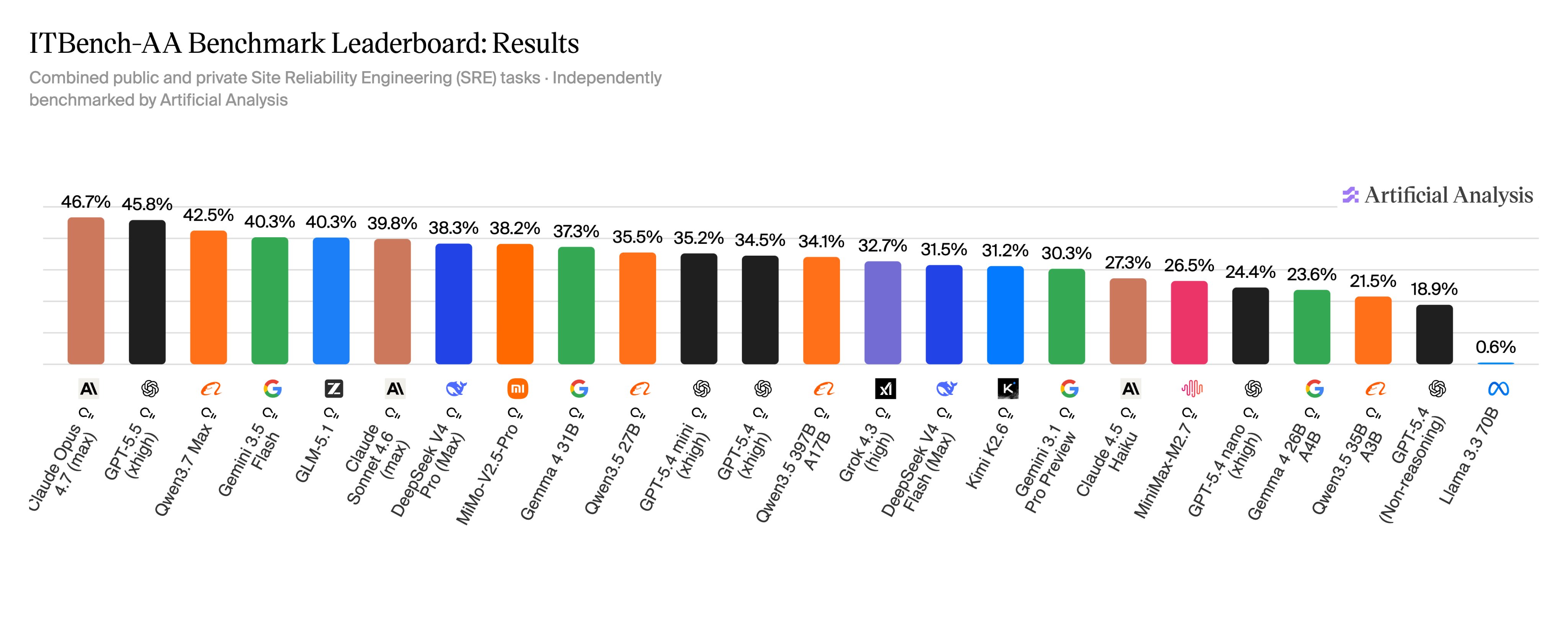
ITBench-AA Benchmark: AI model performance on complex autonomous tasks. Claude Opus 4.7 leads at 46.7%, GPT-4.5 at 45.8%.

ITBench-AA Benchmark (Artificial Analysis, 2026) — Measures performance on complex, autonomous SRE tasks. Claude Opus 4.7 leads at 46.7%, GPT-4.5 close behind at 45.8%. For everyday use, the differences between top models are subtle. Try them and find your preference.
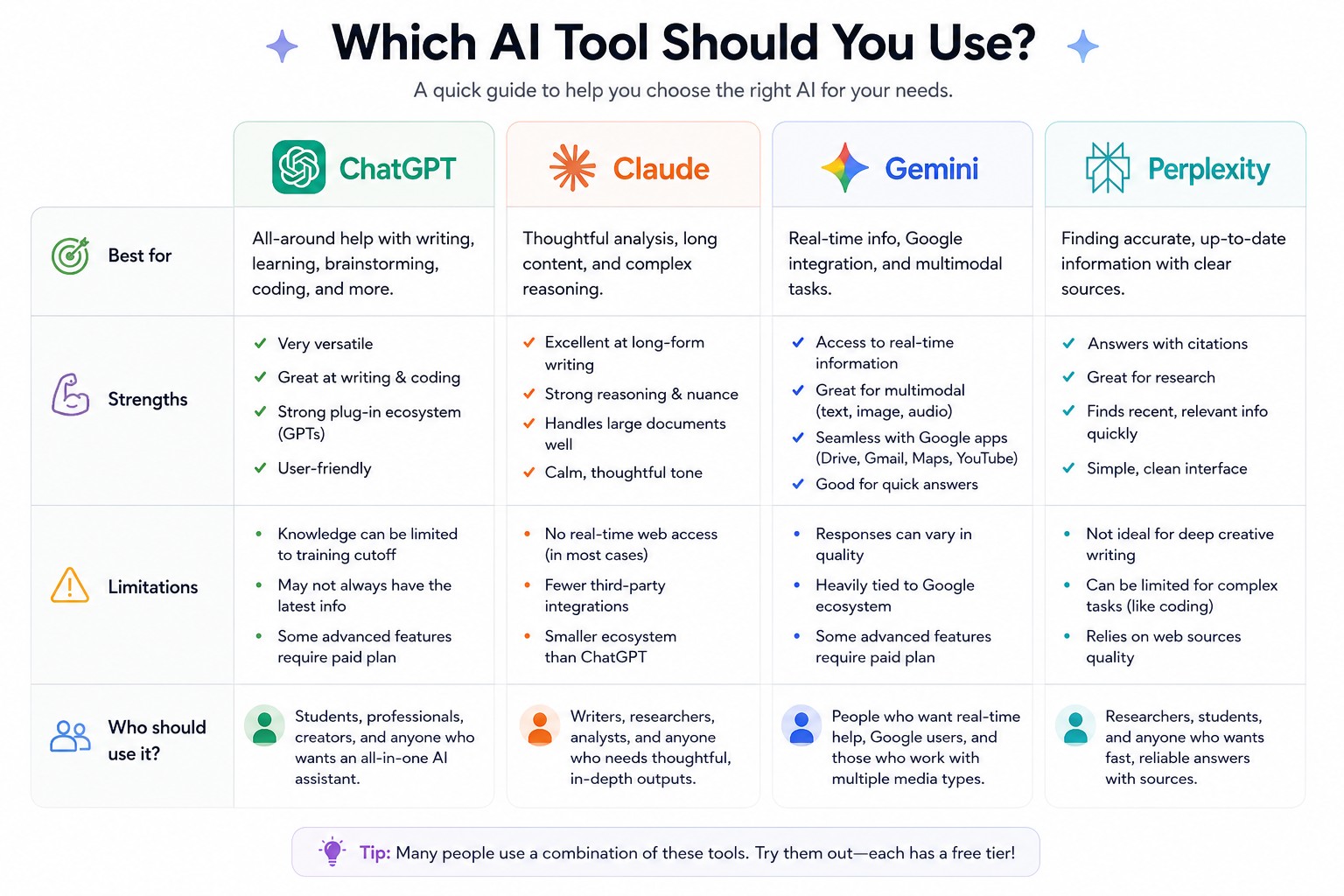
Which AI Assistant: ChatGPT vs Claude vs Gemini vs Perplexity — best uses, strengths, limitations, and who each tool is for

Not sure which AI to use? Each tool has a different personality and strength. ChatGPT is the most versatile. Claude excels at writing and nuance. Gemini connects to your Google apps. Perplexity is the search-first option.
🎨
Create — Images
Turn a description into a photograph, illustration, infographic, or design.
Google ImageFX (Imagen 3)
Google · Fast, photorealistic, excellent free entry point
Strong balance of speed and image quality. Great for marketers and designers who want photorealistic or stylized visuals without spending time fine-tuning prompts. Try it free at ImageFX.
Free at ImageFX
ChatGPT 4o Images
OpenAI · Image generation built into your conversations
If you already use ChatGPT, image generation is built in. Context-aware visuals with just a few clicks — great for social media graphics, presentations, and mockups.
Included with ChatGPT Plus
Adobe Firefly
Adobe · Commercial-safe images inside Creative Cloud
Deep integration with Photoshop and Illustrator. All generated images are safe for commercial use. The choice for design professionals and agencies who need AI output they can legally publish.
Included with Creative Cloud
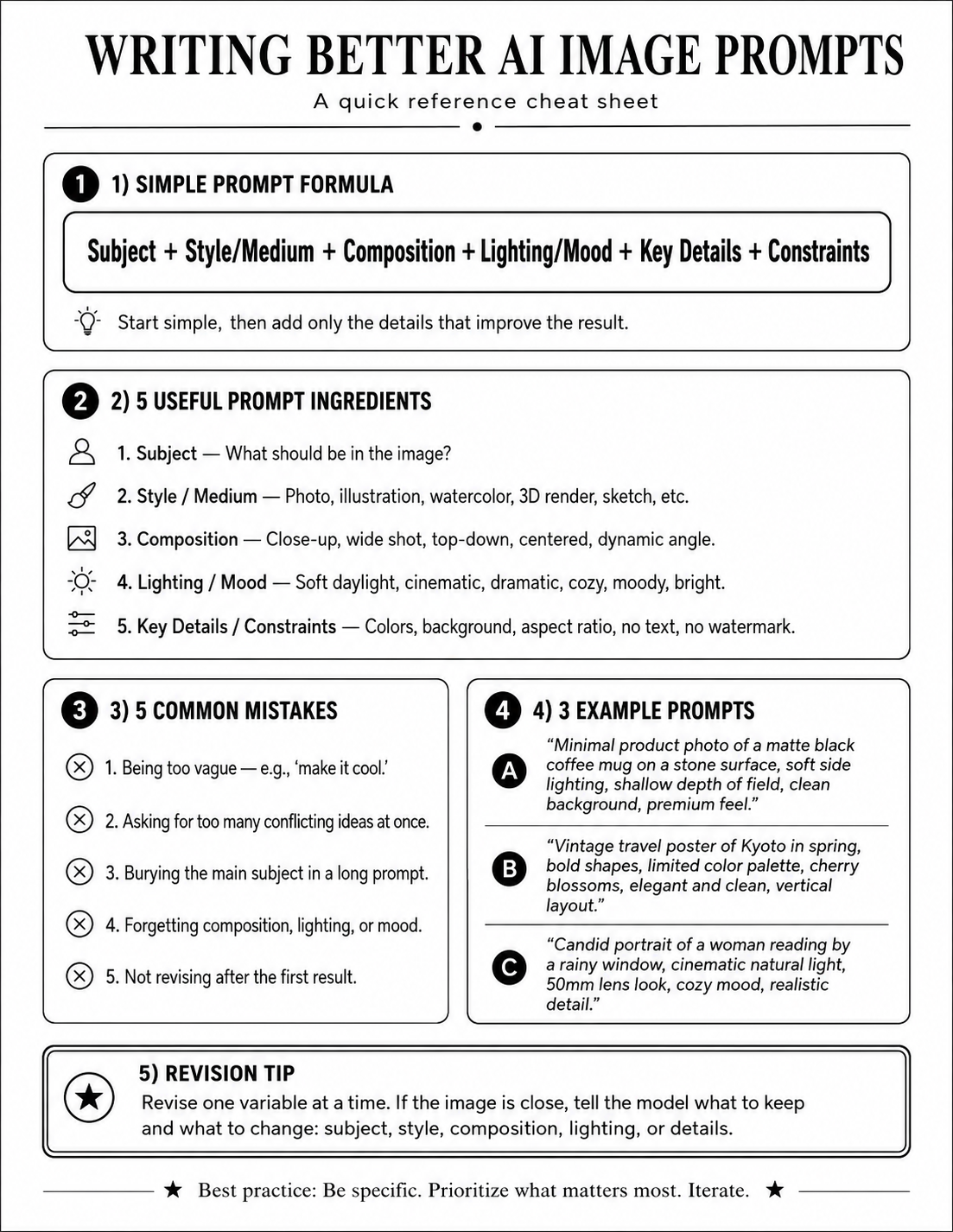
Writing Better AI Image Prompts cheat sheet: Subject + Style/Medium + Composition + Lighting/Mood + Key Details + Constraints

Keep this formula handy: Subject + Style/Medium + Composition + Lighting/Mood + Key Details + Constraints. The full prompt library below has 47 ready-to-use examples.
🎬
Create — Video & Voice
Generate video clips, voiceovers, and AI-produced music.
OpenAI Sora
OpenAI · Short AI-generated video clips
Generates short video and image clips from prompts. Built directly into ChatGPT Plus. Excellent for B-roll, social content, and creative projects.
Included with ChatGPT Plus
Descript
Podcasters, video editors, content creators
Edit audio and video the way you'd edit a text document. AI features include filler-word removal and voice cloning. A significant time-saver for anyone producing regular content.
Free · 3 hrs transcription
ElevenLabs
Creators needing professional voiceovers
Ultra-realistic AI voice generation with cloning, multilingual dubbing, and emotional control. A full creative suite for podcast-quality narration without hiring voice talent.
Free tier available
Suno AI
Anyone who wants to create music from a text prompt
Full songs — vocals, instruments, structure — from a single description. Whether you need background music for a video or want to write an original song, Suno makes it accessible.
Free tier available
📋
Organize — Meetings & Notes
Never lose what was said in a meeting again.
Fireflies.ai
Teams with regular meetings
Joins calls, records, transcribes, and turns conversations into searchable summaries with action items. Supports 100+ languages. Free tier includes unlimited transcription.
Free tier · unlimited transcription
Jamie
Founders, managers, and anyone who leads meetings
Captures meetings quietly without bots or browser extensions. Instant, structured summaries with tasks and key takeaways. Privacy-focused and remarkably accurate.
Free · 10 meetings/month
Notion AI
Notion users who want AI built into their workspace
AI assistance — writing, summarizing, task generation, database queries — directly inside your Notion workspace. Connects to GPT-4 and Claude without separate subscriptions.
Free trial in all accounts
✍️
Write & Polish
From quick grammar fixes to long-form creative collaboration.
Grammarly
Anyone who writes and publishes content regularly
Grammar, tone, rewriting, and AI/human authorship checks inside your favorite apps. The free tier includes 100 AI prompts/month and a browser extension that works almost everywhere.
Free · 100 prompts/month
Claude
Writers who want a long-form collaborator
Claude excels at brainstorming, outlining, rewriting, and matching your voice. Use it for research, drafting sermons, writing letters, or polishing anything that needs to sound like you.
Free · full writing features
Canva
Visual content without design experience
Drag-and-drop design with AI features including Magic Edit, background removal, and Magic Expand. Fast, polished graphics for social media, presentations, flyers, and more.
Free · Pro $12.99/mo
⚙️
Automate & Connect
Connect your apps and build workflows without writing code.
Zapier
Non-technical teams who want automation without a developer
Connects 8,000+ apps using triggers and workflows. "When this happens in App A, do this in App B." Now includes AI agents that can take real actions across your entire software stack.
Free · 100 tasks/month
Make
Teams who need more control than Zapier, without the price
Visual canvas automation with branching logic and AI agents built in. More powerful than Zapier, more affordable at scale. Free plan includes 1,000 operations/month.
Free · 1,000 ops/month

AI Characters — Built Once, Used Again and Again

The video below demonstrates a capability that goes far beyond generating text or images: a consistent, recurring AI persona. Meet Dr. Enzocto Dofleini — a fictional Johns Hopkins University professor whose name is a playful nod to the Giant Pacific Octopus (Enteroctopus dofleini).

Dr. Enzocto Dofleini is not a real person. He is an AI-generated character — built once and capable of being reused indefinitely. This is what recurring AI characters mean in practice: marketing professionals can build a brand spokesperson. Doctors can create a patient-facing explainer who is always available. Educators can build a classroom presenter. Content creators can build a consistent on-screen voice without ever appearing on camera. The character is created once, and then you talk through it as many times as you need.

🩺
Healthcare
A physician's AI character explains post-op care, answers common patient questions, or delivers medication reminders — consistently, 24 hours a day, without burnout.
📚
Education
A teacher or professor builds a consistent classroom presence for recorded lessons, supplemental content, or flipped-classroom videos — without filming themselves every session.
📢
Marketing
A brand creates a spokesperson for product demos, social media content, or explainer videos that maintains a consistent look, voice, and personality across every piece of content.
Ministry
A church or ministry creates a guide character for devotional content, Bible study supplements, or outreach materials — consistent, scalable, and produced without professional video equipment.

47 Prompts You Can Use Today

These prompts are organized by use case. Copy, adapt, and run them in ChatGPT, Gemini, or any image-capable AI. Faith-community prompts are highlighted — and shown with their actual AI-generated outputs below.

The Formula

Subject + Style/Medium + Composition + Lighting/Mood + Key Details + Constraints
Start simple. Add only the details that improve the result. Revise one variable at a time.

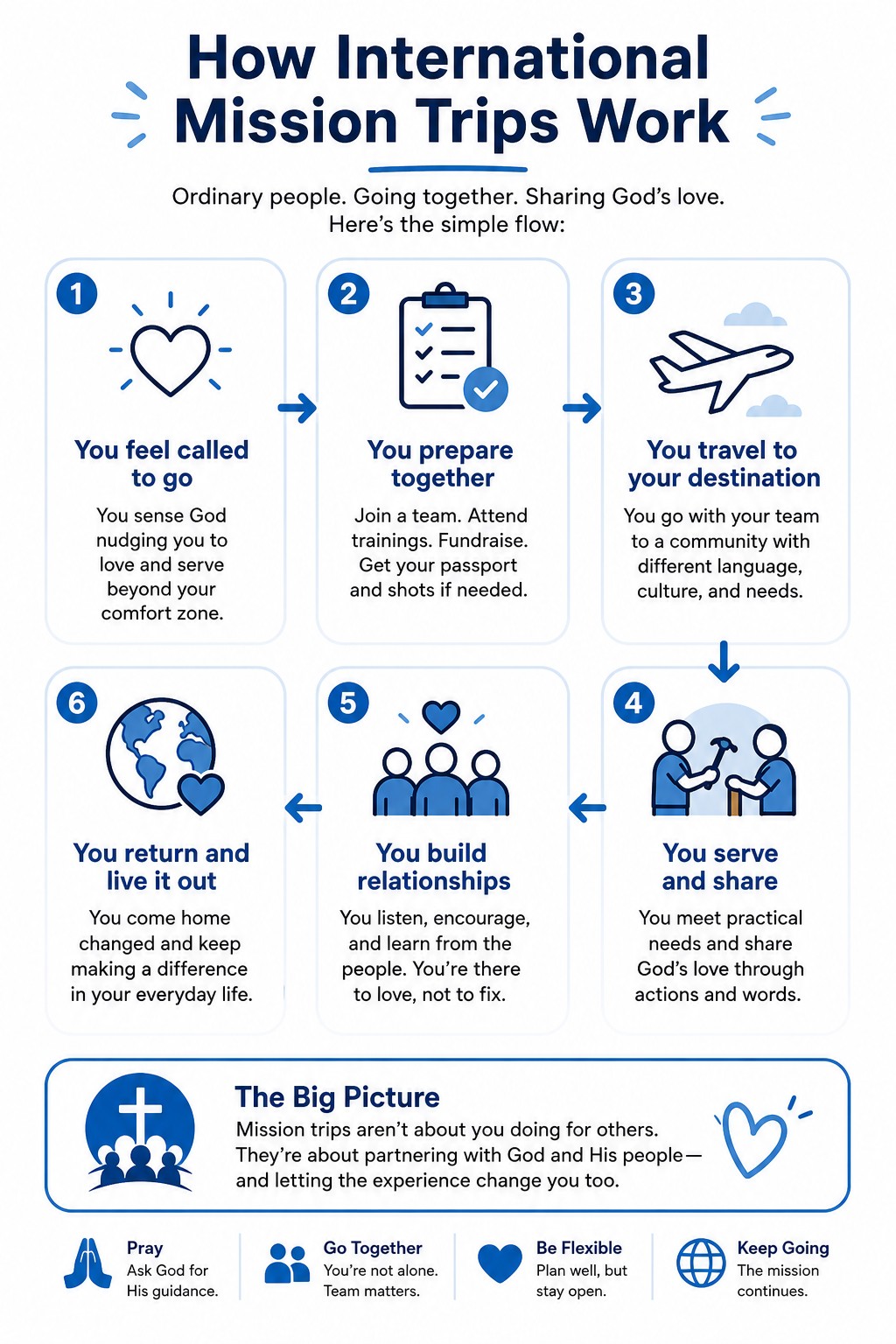
AI-generated infographic: How International Mission Trips Work Click to expand
Faith Use

1. Explain a Concept in Images

An infographic explaining mission trips to someone with no prior church experience.

Create an infographic that explains how International Mission Trips work to a non-experienced Christian audience. You decide the wording, structure, examples, and visual metaphor. Requirements: Make it understandable in under 60 seconds Include a simple flow Use plain English Avoid jargon Keep all text readable Style: Clean modern explainer infographic, white background, blue accents, rounded cards, simple icons.

Works well in: ChatGPT 4o, Google Gemini, Adobe Firefly

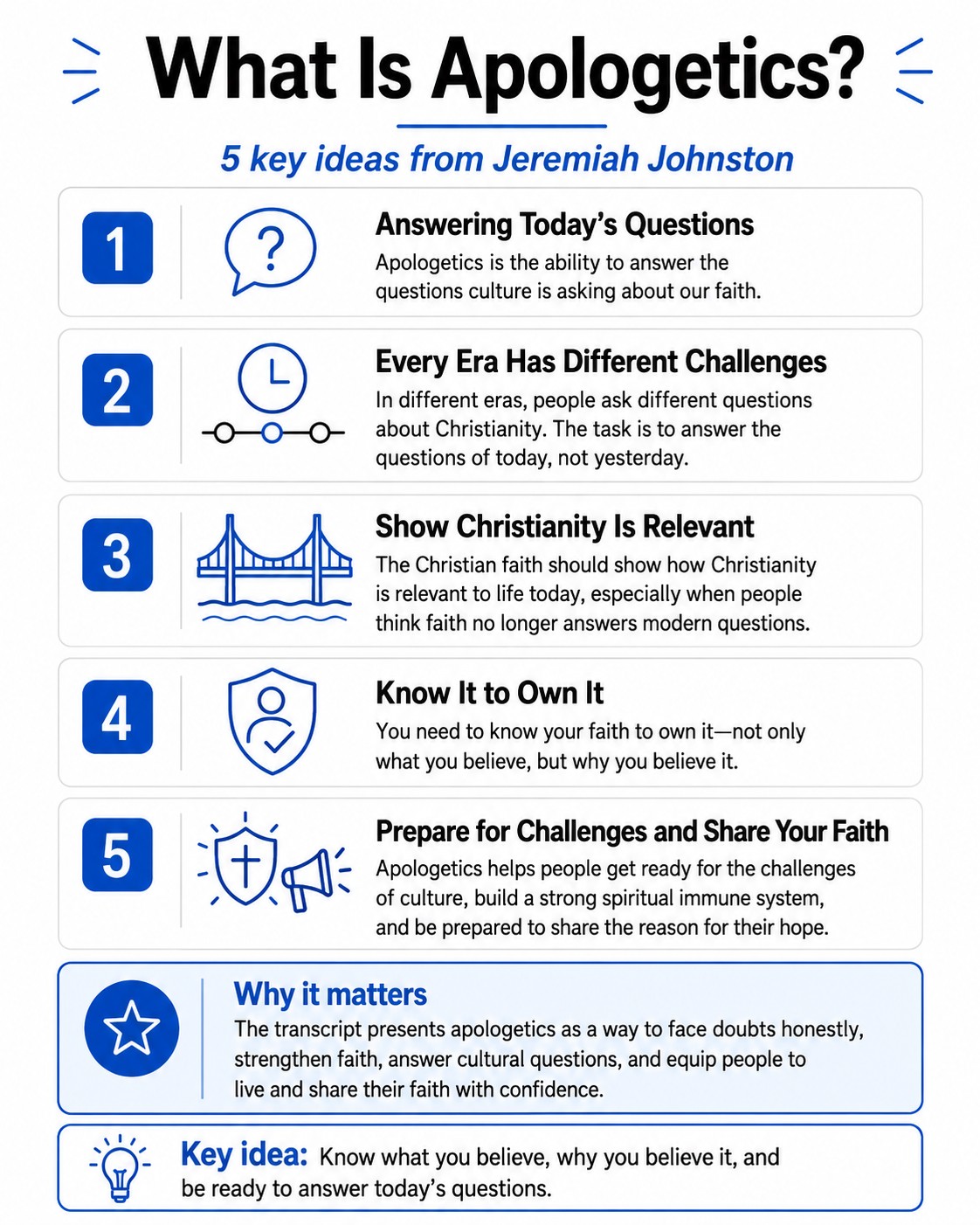
AI-generated visual explainer from Apologetics seminar content Click to expand
Faith Use

2. Video to Graphic for Presentations

Turn a sermon, seminar, or video into a shareable visual explainer. Gemini can pull directly from a YouTube link.

Turn the information below into a clean visual explainer. Goal: Make this easy for a general audience to understand in under 30 seconds. Create: A clear title 5 key takeaways Simple icons A visual hierarchy A short "why it matters" box Style: Modern tech explainer graphic, white background, black text, blue accent color, rounded cards, thin lines, readable typography. Use only the information provided. Do not invent facts. SOURCE TEXT: [paste transcript or YouTube link] Note: Gemini can accept a YouTube link directly. ChatGPT needs the transcript pasted in.

Works well in: Google Gemini (YouTube link), ChatGPT 4o (paste transcript)

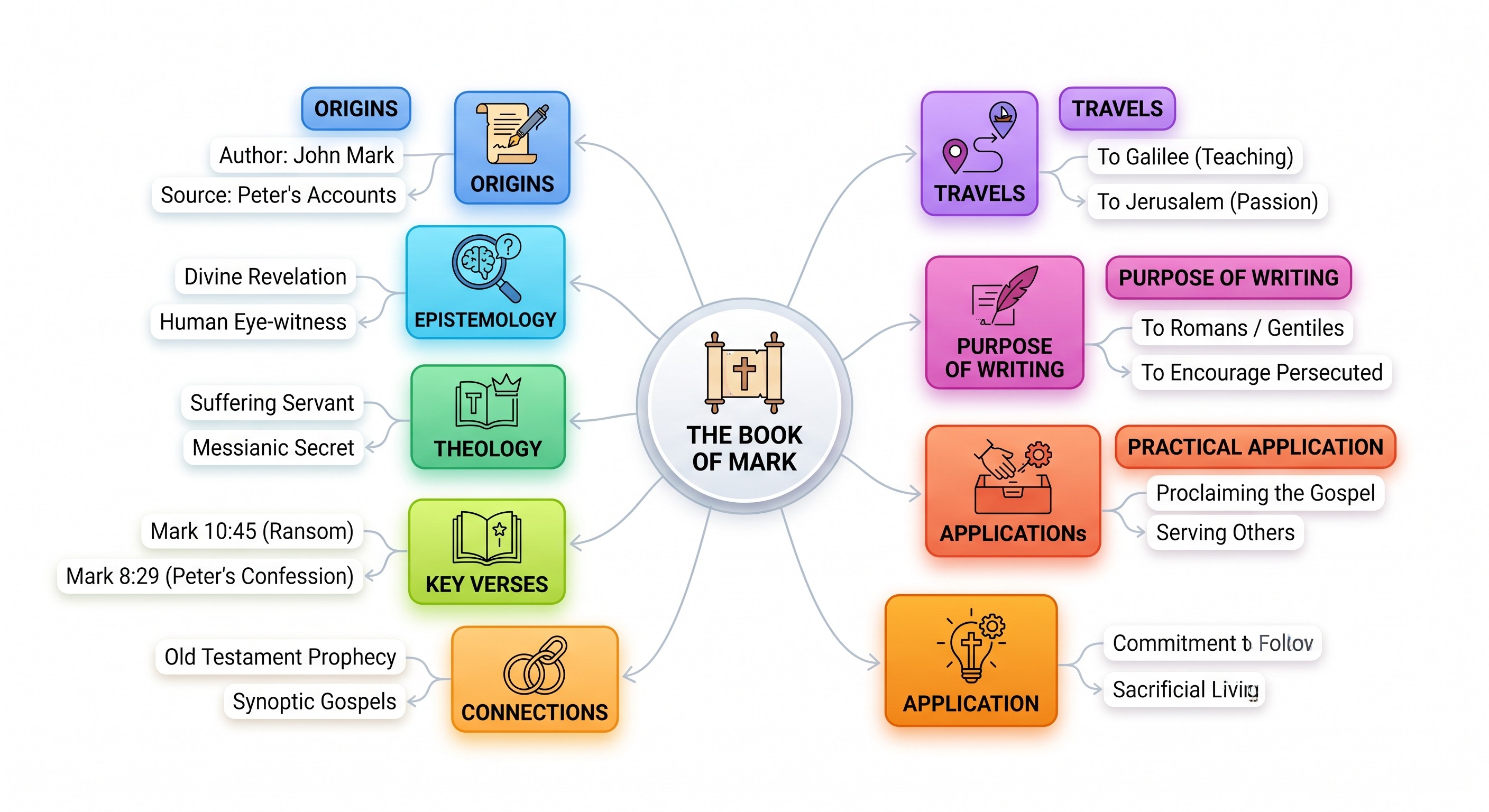
AI-generated mind map of the Gospel of Mark Click to expand
Faith Use

6. Create a Visual Mind Map of Anything

Map any book of the Bible, theological concept, or sermon series visually.

Create a mind map titled: The Gospel of Mark Center node: The Book of Mark Branches: Origins · Epistemology · Theology · Key Verses Connections · Application · Practical Application Purpose of Writing · Travels Under each branch, add 2 small subpoints. Style: Clean, modern, colorful but not childish, readable text, white background, thin connector lines.

Works well in: Google Gemini, ChatGPT 4o

Faith Use

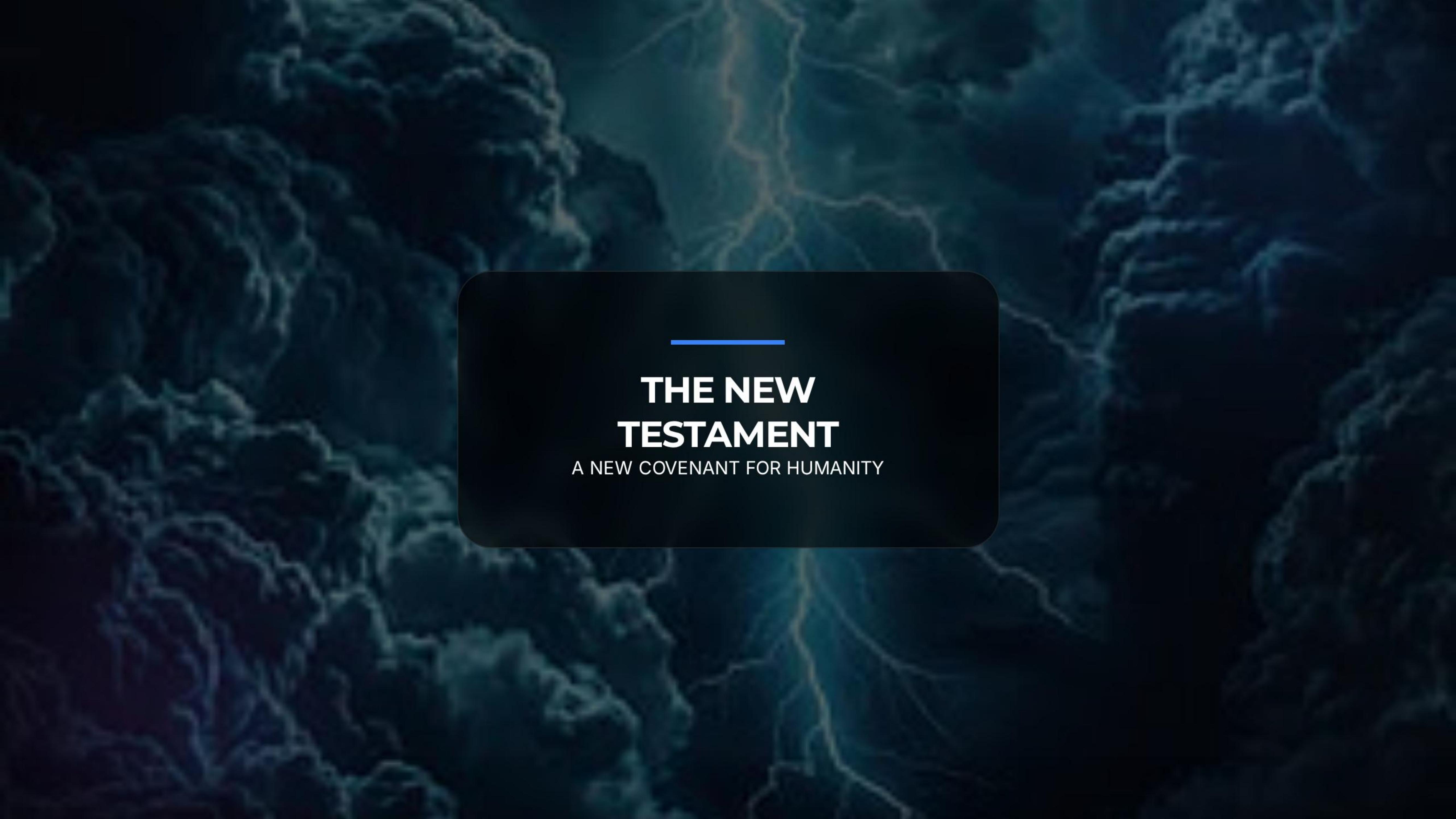
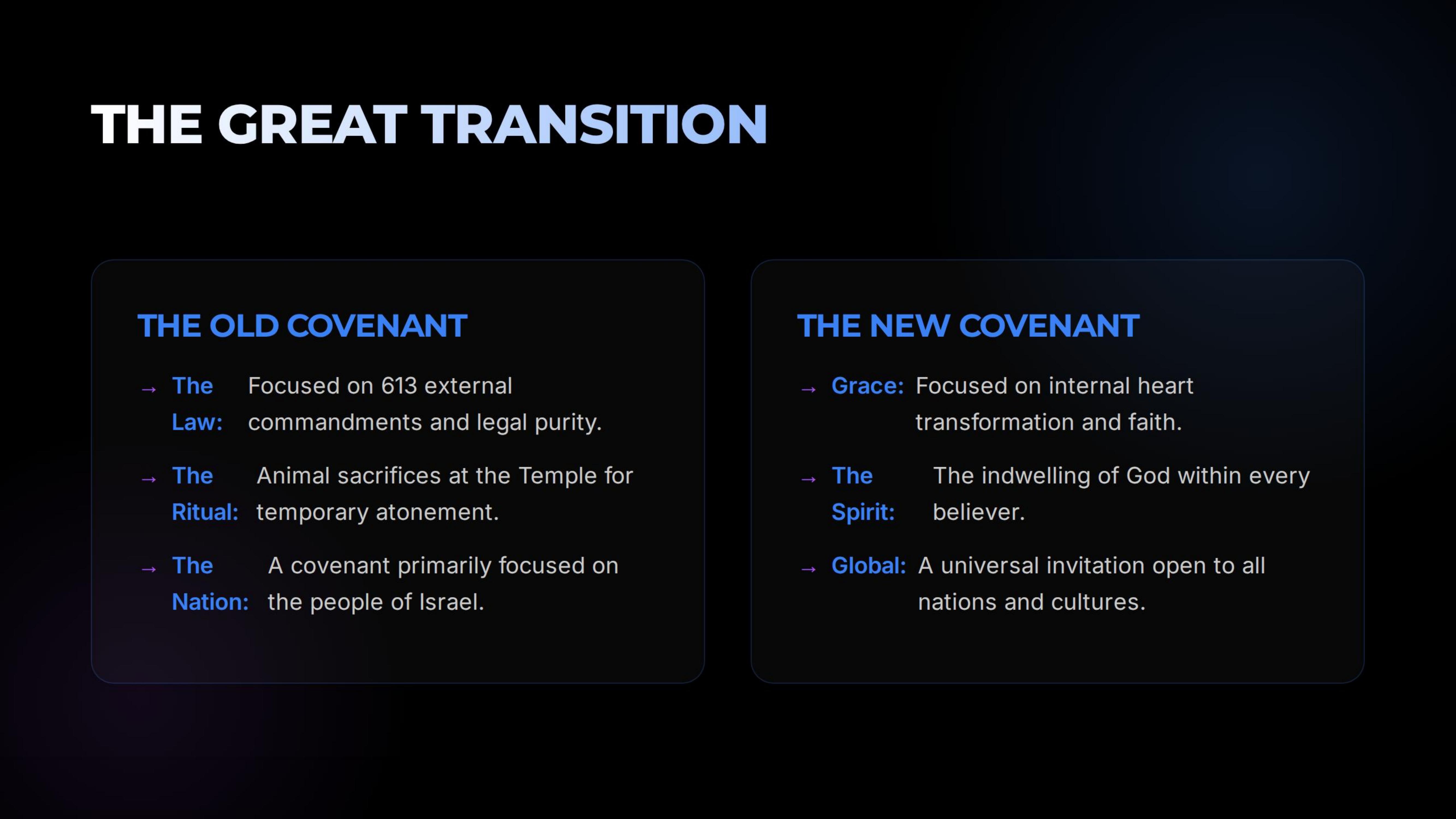
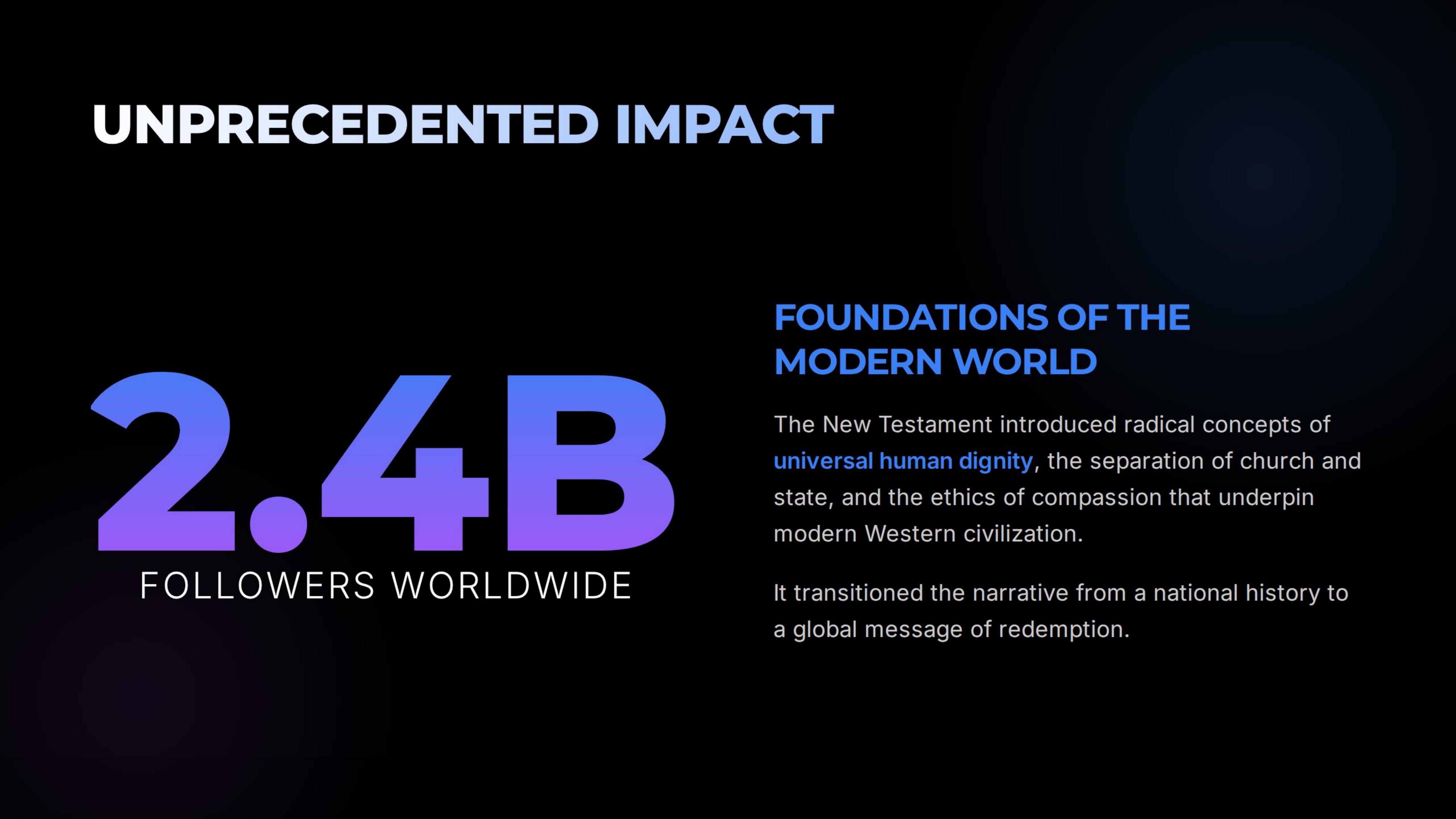
8. Create a Multi-Slide Visual Presentation

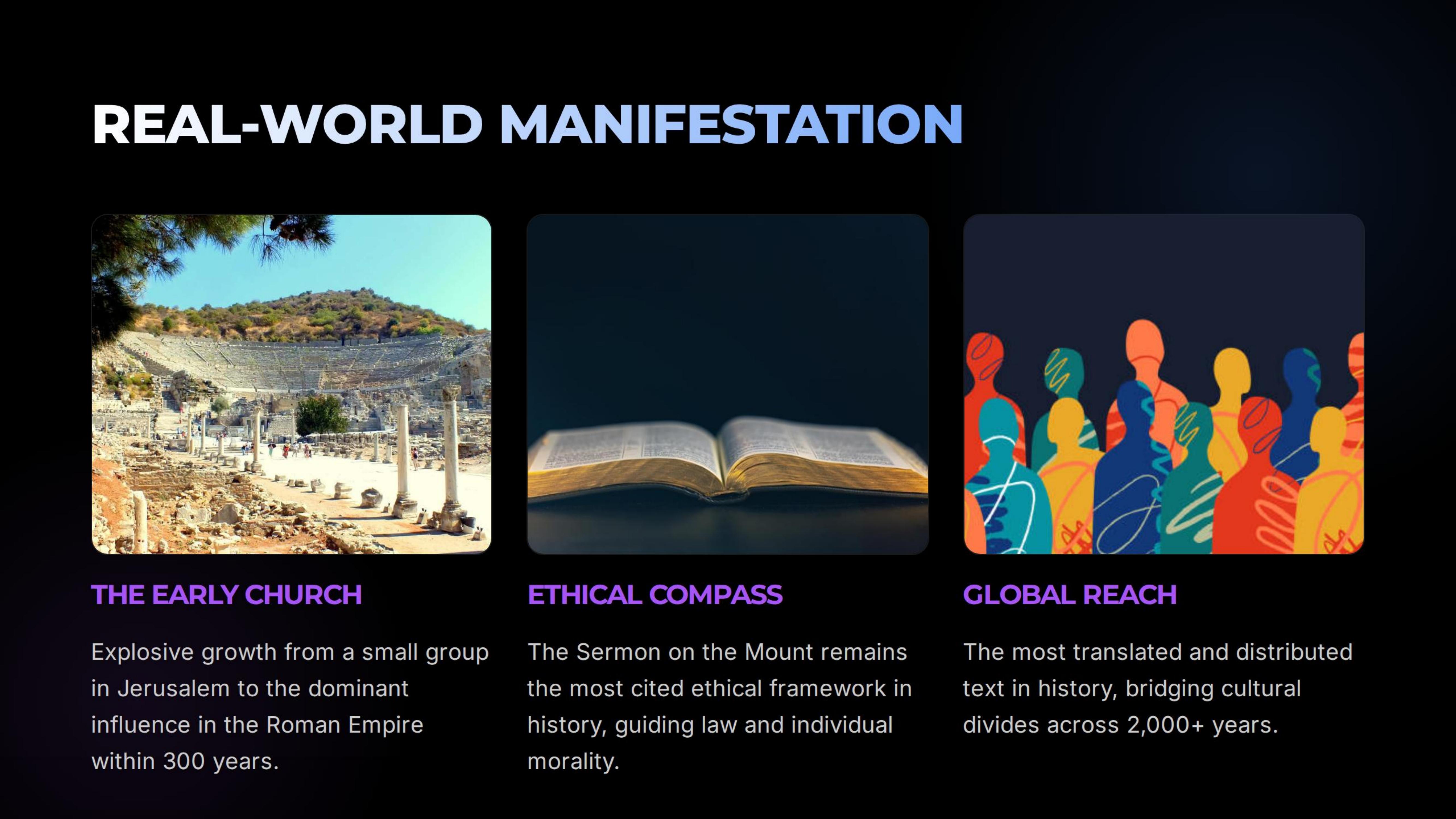
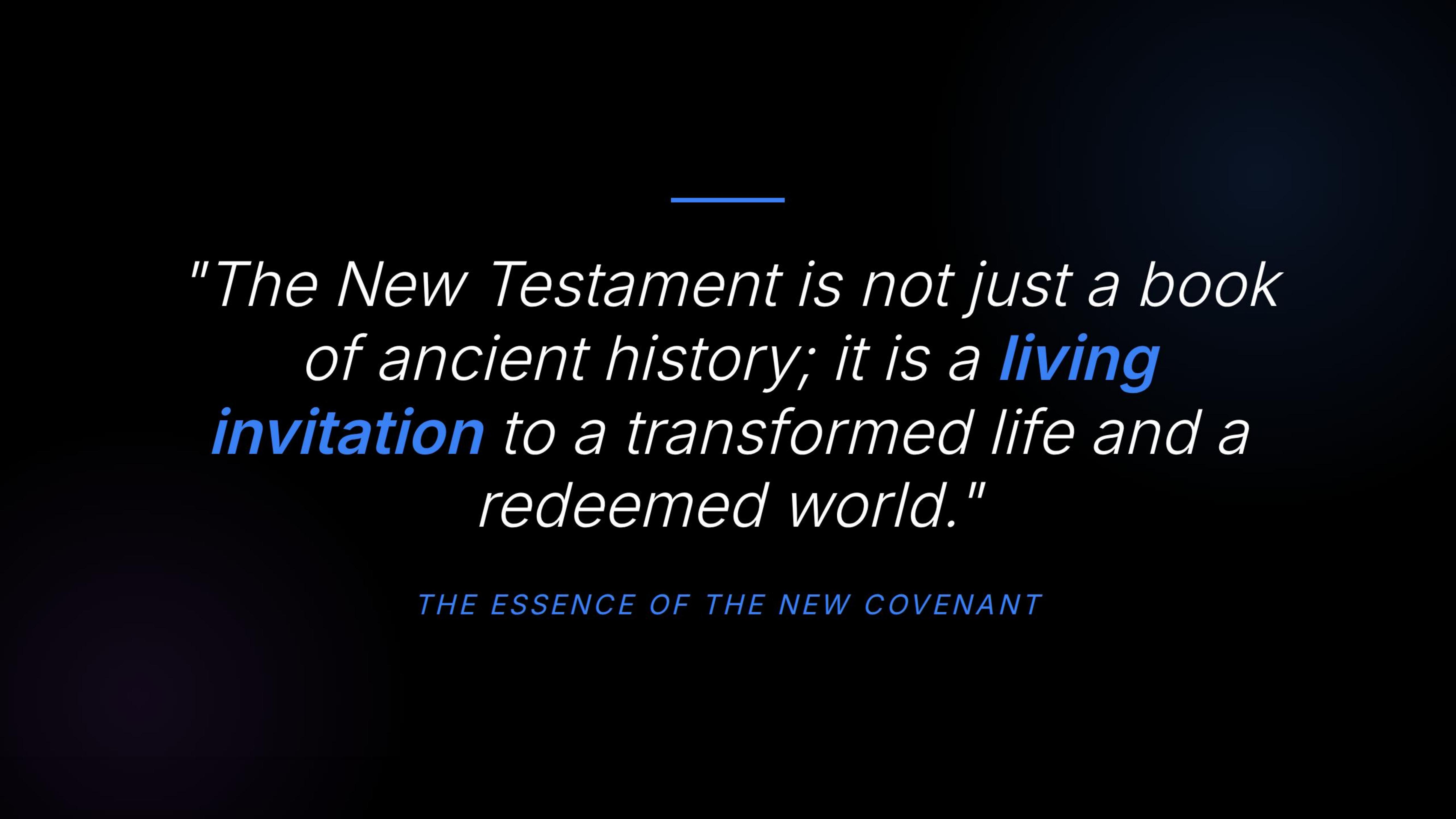
A polished 5-slide keynote-style deck on any topic — here shown for The New Testament. Tap any thumbnail to view full slide.

Create a 5-slide visual presentation about The New Testament. Slides: 1. Title slide 2. What changed 3. Why it matters 4. Real-world examples 5. Final takeaway Requirements: Make it look like a polished keynote deck. Keep the text short and readable. Style: Premium tech presentation, black background, white text, blue/purple accents, clean minimal layouts.

Works well in: ChatGPT 4o, Google Gemini

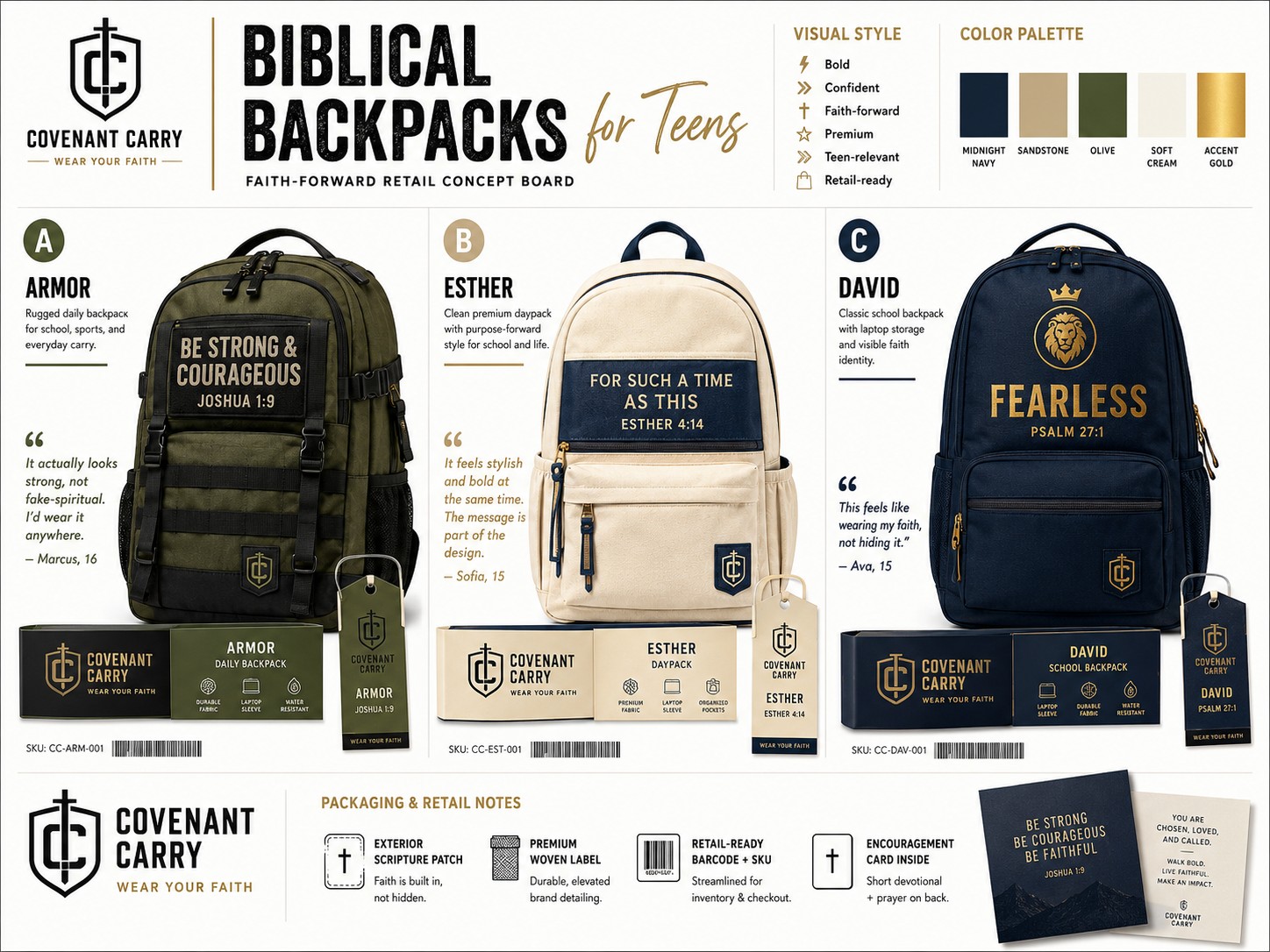
AI-generated product packaging concept: Biblical Backpacks for Teens — Covenant Carry brand Click to expand
Faith Use

10. Product Packaging Concept Sheet

AI designed a complete brand concept — names, quotes, color palette, and three backpack mockups — from a single prompt.

Create a product packaging concept sheet for Biblical Backpacks for Teens. You decide: Bag names · Backpack testimonial quotes Visual style · Color palette · 3 backpack mockups Requirements: Make it look like a real CPG brand concept presentation. Text should be readable. Packaging should feel modern and retail/shelf/store-ready. Style: Clean premium design, studio mockup lighting, organized concept board.

Works well in: ChatGPT 4o Images, Google Gemini

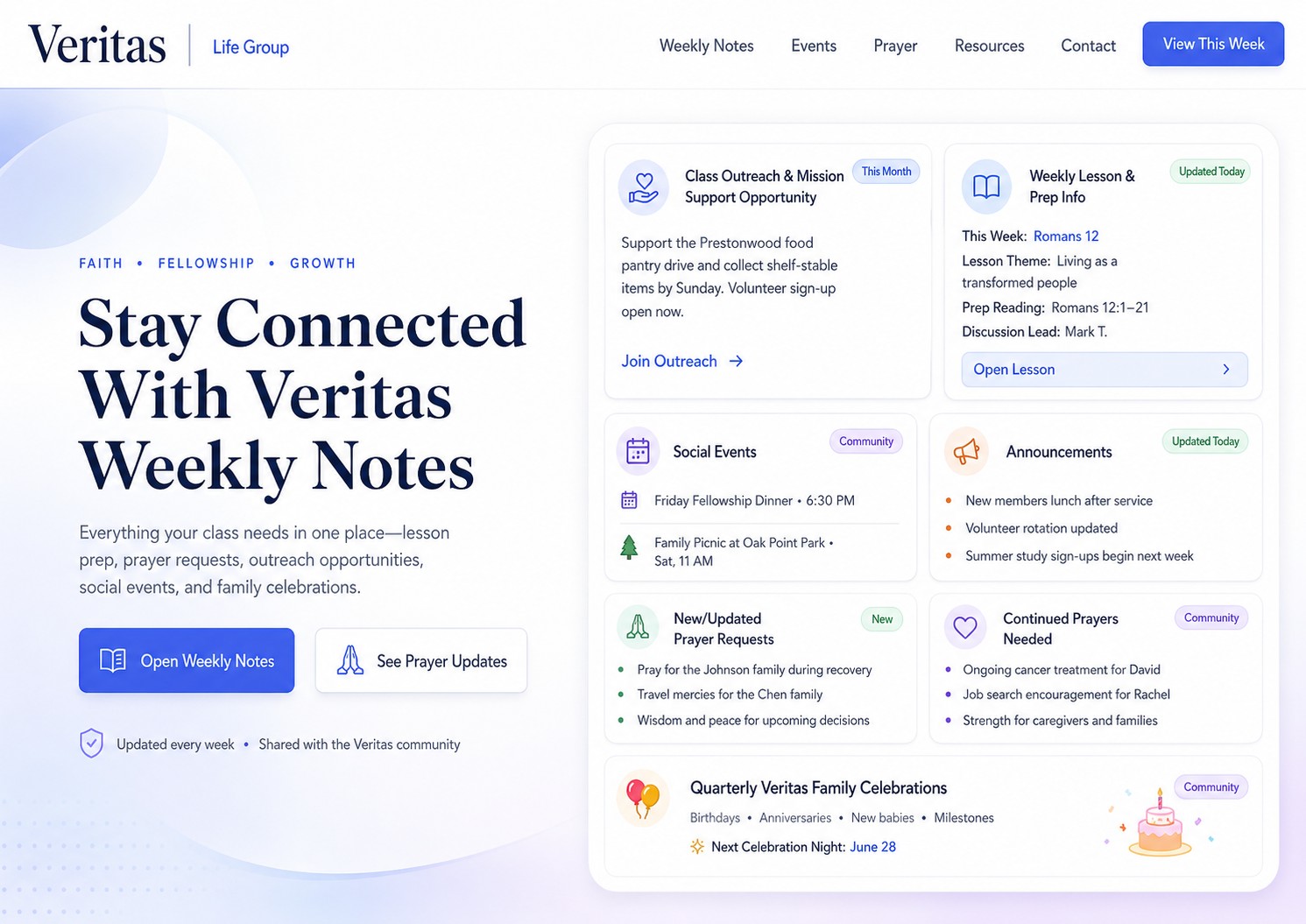
AI-generated website hero section mockup for Veritas Life Group Weekly Notes Click to expand
Faith Use

15. Website Visuals

A polished website hero section mockup for a life group's weekly notes page — designed in one prompt.

Create a website hero section mockup for the Veritas Life Group Weekly Notes. Include: Class Outreach & Mission Support Opportunity Weekly Lesson & Prep Info Social Events · Announcements New/Updated Prayer Requests Continued Prayers Needed Quarterly Veritas Family Celebrations You decide what goes into each section for mockups. Requirements: Make it look like a real modern SaaS homepage. Keep the text readable and the layout clean. Style: Premium SaaS website hero, white background, subtle gradients, rounded UI cards, modern typography.

Works well in: ChatGPT 4o, Google Gemini

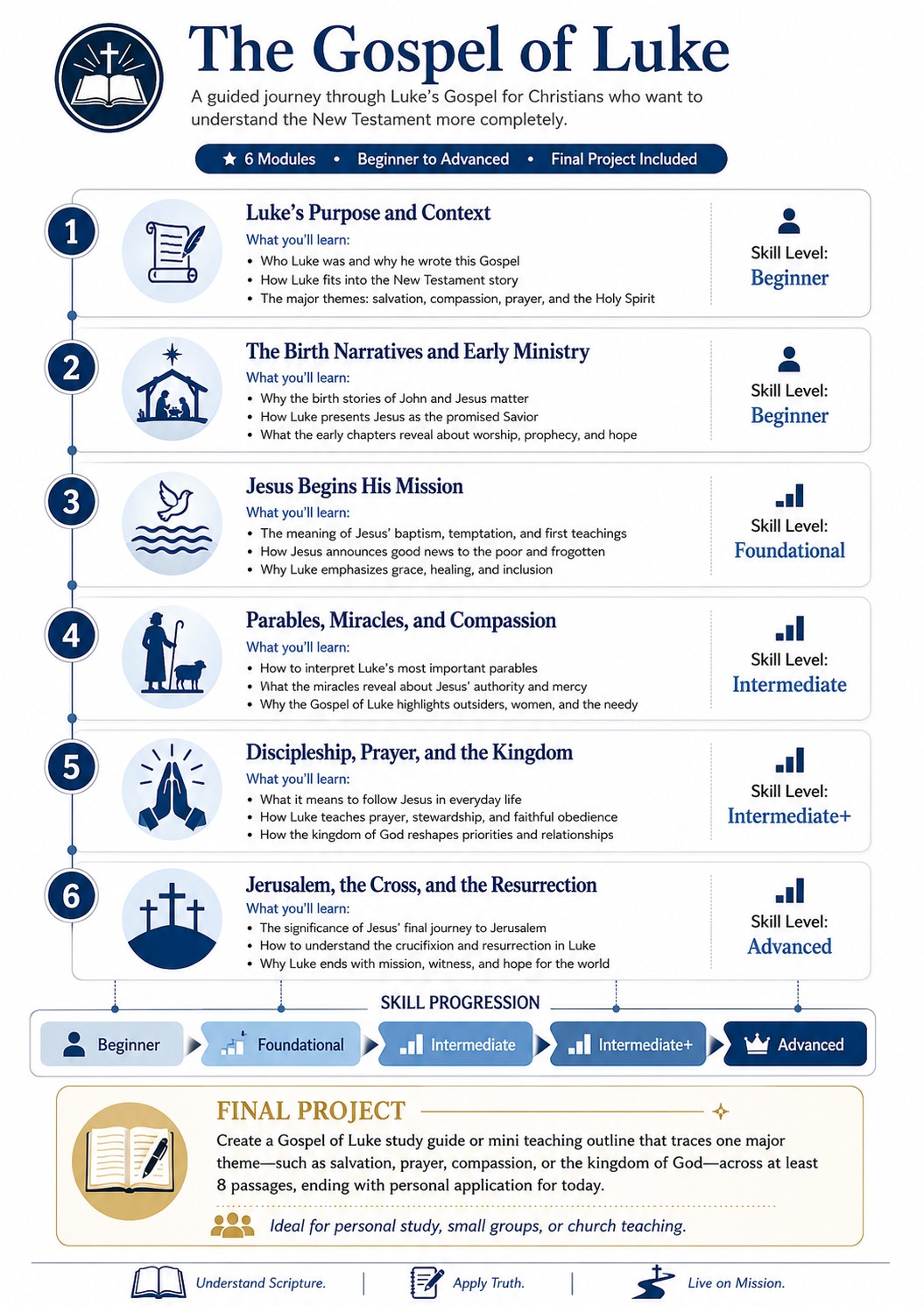
AI-generated visual course curriculum for The Gospel of Luke Click to expand
Faith Use

17. Visual Curriculum for Any Course

A full 6-module course curriculum graphic for a Bible study — structured, readable, and sales-page ready.

Create a visual course curriculum graphic for a course called The Gospel of Luke. Audience: Christians who want to understand the New Testament more completely. You decide the module names and structure. Include: 6 modules · What each module teaches Skill level progression · Final project Requirements: Make it useful as a course sales page visual or PDF insert. Keep the design clear and readable. Style: Clean online course curriculum design, white background, blue accents, organized module cards.

Works well in: ChatGPT 4o, Google Gemini

1. Explain How Mission Trips WorkFaith Use +

Infographic explaining International Mission Trips to a non-experienced Christian audience.

Create an infographic that explains how International Mission Trips work to a non-experienced Christian audience. You decide the wording, structure, examples, and visual metaphor. Requirements: Make it understandable in under 60 seconds Include a simple flow · Use plain English · Avoid jargon · Keep all text readable Style: Clean modern explainer infographic, white background, blue accents, rounded cards, simple icons.

Works well in: ChatGPT 4o, Google Gemini

2. Video to Graphic for PresentationsFaith Use +

Turn a sermon, seminar video, or article into a shareable visual explainer. Gemini can pull directly from a YouTube link.

Turn the information below into a clean visual explainer. Goal: Make this easy for a general audience to understand in under 30 seconds. Create: A clear title · 5 key takeaways · Simple icons · A visual hierarchy · A short "why it matters" box Style: Modern tech explainer graphic, white background, black text, blue accent color, rounded cards, thin lines, readable typography. Use only the information provided. Do not invent facts. SOURCE TEXT: [paste transcript or YouTube link] Note: Gemini can accept a YouTube link directly. ChatGPT needs the transcript pasted in.

Works well in: Google Gemini (YouTube link), ChatGPT 4o (paste transcript)

6. Visual Mind Map of AnythingFaith Use +

Map any book of the Bible, theological concept, or sermon series visually.

Create a mind map titled: The Gospel of Mark Center node: The Book of Mark Branches: Origins · Epistemology · Theology · Key Verses · Connections · Application · Practical Application · Purpose of Writing · Travels Under each branch, add 2 small subpoints. Style: Clean, modern, colorful but not childish, readable text, white background, thin connector lines

Works well in: Google Gemini, ChatGPT 4o

8. Multi-Slide Visual PresentationFaith Use +

A polished 5-slide keynote-style deck on any topic. Shown above with The New Testament as the example.

Create a 5-slide visual presentation about [YOUR TOPIC]. Slides: 1. Title slide · 2. What changed · 3. Why it matters · 4. Real-world examples · 5. Final takeaway Requirements: Make it look like a polished keynote deck. Keep the text short and readable. Style: Premium tech presentation, black background, white text, blue/purple accents, clean minimal layouts.

Works well in: ChatGPT 4o, Google Gemini

10. Product Packaging Concept SheetFaith Use +

AI designed a full brand concept for Biblical Backpacks — names, quotes, color palette, and three mockups — in one prompt.

Create a product packaging concept sheet for Biblical Backpacks for Teens. You decide: Bag names · Backpack testimonial quotes · Visual style · Color palette · 3 backpack mockups Requirements: Make it look like a real CPG brand concept presentation. Text should be readable. Packaging should feel modern and retail/shelf/store-ready. Style: Clean premium design, studio mockup lighting, organized concept board.

Works well in: ChatGPT 4o Images, Google Gemini

15. Website VisualsFaith Use +

A polished website hero section mockup — shown here for a life group's weekly notes page.

Create a website hero section mockup for the Veritas Life Group Weekly Notes. Include: Class Outreach & Mission Support · Weekly Lesson & Prep Info · Social Events · Announcements · New/Updated Prayer Requests · Continued Prayers Needed · Quarterly Veritas Family Celebrations Requirements: Make it look like a real modern SaaS homepage. Keep text readable and layout clean. Style: Premium SaaS website hero, white background, subtle gradients, rounded UI cards, modern typography.

Works well in: ChatGPT 4o, Google Gemini

17. Visual Curriculum for Any CourseFaith Use +

A full 6-module course curriculum graphic for a Bible study — structured, readable, and sales-page ready.

Create a visual course curriculum graphic for a course called The Gospel of Luke. Audience: Christians who want to understand the New Testament more completely. Include: 6 modules · What each module teaches · Skill level progression · Final project Requirements: Make it useful as a course sales page visual or PDF insert. Keep the design clear and readable. Style: Clean online course curriculum design, white background, blue accents, organized module cards.

Works well in: ChatGPT 4o, Google Gemini

3. Timeline Graphics from Prompts +

Generate a sleek editorial timeline for any historical sequence, project roadmap, or Bible narrative.

Create a horizontal timeline graphic titled: "The Evolution of AI Image Generation" Include these milestones: 2021 - Text-to-image begins going mainstream 2022 - AI art tools explode in popularity 2023 - Better realism and style control 2024 - Image editing becomes more practical 2025 - Text rendering improves dramatically 2026 - AI images become useful design tools Style: Sleek editorial timeline, black and white with subtle neon blue accents, readable labels, thin lines, rounded milestone cards.

Works well in: ChatGPT 4o, Google Gemini

4. Process Diagram Anything +

Flowchart any workflow — business process, Bible study structure, event planning sequence.

Create a process diagram for a small business using AI to handle customer inquiries. The diagram should show: Customer message comes in → AI categorizes it → AI drafts a response → Human reviews if needed → Response is sent → Common questions are logged → Business improves the FAQ Requirements: Make it practical and easy to understand. Use a clear flowchart layout. Style: Professional business workflow diagram, white background, thin lines, blue accents, rounded nodes.

Works well in: ChatGPT 4o, Google Gemini

5. Compare and Contrast Any Choice Visually +

A side-by-side comparison chart for any decision — tools, options, candidates, Bible translations.

Create a visual comparison chart for choosing between [ChatGPT, Claude, Gemini, and Perplexity]. Audience: Normal people who are confused about which AI tool to use. You decide the categories and wording. Include: Best for · Strengths · Limitations · Who should use it Requirements: Keep the chart simple, useful, and not too crowded. Use current general knowledge. Avoid unsupported claims. Style: Clean tech buying guide, white background, rounded cards, readable table layout, subtle colored accents.

Works well in: ChatGPT 4o, Google Gemini

7. Create Cheat Sheets with Visual Cues +

A printable one-page reference sheet for any topic — AI tools, Bible memory verses, procedure checklists.

Create a printable cheat sheet for [writing better AI image prompts]. Include: A simple prompt formula · 5 useful prompt ingredients · 5 common mistakes · 3 example prompts · Revision tip Requirements: Make it genuinely useful and easy to reference. Keep text readable. Style: Minimal black-and-white reference sheet, thin lines, rounded boxes, elegant typography, printable layout.

Works well in: ChatGPT 4o, Google Gemini

18. Messy Notes Into Actionable Plan +

Upload a photo of handwritten notes or paste raw text — AI turns it into a clean, structured one-page visual plan.

Turn these messy notes into a polished visual action plan. [Upload Messy Notes or paste text] Audience: A creator or entrepreneur who feels overwhelmed. Create: A one-page visual plan that could be printed and kept on a desk. You decide the best title, sections, hierarchy, and wording. Include: Main goal · Biggest bottleneck · 3 priorities · What to stop doing · What to do next · A simple 7-day action plan Requirements: Do not simply repeat the notes. Organize them into something practical, clear, and visually useful. Style: Premium productivity planner, black and white with subtle purple accents, rounded cards, thin lines, lots of whitespace.

Works well in: ChatGPT 4o, Google Gemini

45. Explanatory Infographics +

Explain any complex or technical concept to a non-technical audience in a single glanceable graphic.

Create an infographic that explains how AI agents work to a non-technical audience from a Church Lifegroup. You decide the wording, structure, examples, and visual metaphor. Requirements: Make it understandable in under 60 seconds · Include a simple flow · Use plain English · Avoid jargon · Keep all text readable Style: Clean modern explainer infographic, white background, blue accents, rounded cards, simple icons. Secondary style: Now make it even more colorful and "infographicy".

Works well in: ChatGPT 4o, Google Gemini

46. Timelines +

A horizontal timeline for any historical, Biblical, or project sequence.

Create a horizontal timeline graphic titled: "The Evolution of AI Image Generation" Include these milestones: 2021 - Text-to-image begins going mainstream 2022 - AI art tools explode in popularity 2023 - Better realism and style control 2024 - Image editing becomes more practical 2025 - Text rendering improves dramatically 2026 - AI images become useful design tools Style: Sleek editorial timeline, black and white with subtle neon blue accents, readable labels, thin lines, rounded milestone cards.

Works well in: ChatGPT 4o, Google Gemini

47. Web-Referenced Topic Visual Explainer +

Paste any URL or web content and get a clean visual explainer — useful for turning a news article or research paper into a shareable graphic.

Turn the information below into a clean visual explainer. Goal: Make this easy for a general audience to understand in under 30 seconds. Create: A clear title · 5 key takeaways · Simple icons · A visual hierarchy · A short "why it matters" box Style: Modern tech explainer graphic, white background, black text, blue accent color, rounded cards, thin lines, readable typography. Use only the information provided. Do not invent facts. SOURCE TEXT: [paste article text or URL]

Works well in: ChatGPT 4o, Google Gemini

9. 1-Page Visual Sales Pitch for Any Business +

A polished one-pager you could actually send to a potential client.

Create a one-page sales pitch visual for an automation agency called [Business Name]. Audience: Small business owners. You decide: Headline · Problem · Solution · Services · Benefits · Call to action Requirements: Make it look like something that could be sent to a potential client. Keep it polished and business-friendly. Style: Premium agency one-pager, clean white background, black text, blue accent color, icons, rounded cards.

Works well in: ChatGPT 4o, Google Gemini

11. eCommerce Ready Product Images +

A complete 6-image product set ready for Amazon or Shopify — hero, lifestyle, feature callout, and more.

Create an ecommerce product image set for a Professional Journal for Notes, for a Christian Life Group called Veritas at Prestonwood Baptist Church, Plano, Texas. You decide: Key features (more than just blank pages) · Use-case scenes · Lifestyle image concepts focused around living in faith · Feature callouts that differentiate from a regular notebook Create a grid of 6 product images: 1. Hero product image · 2. Desk lifestyle scene · 3. Feature callout 4. Size/context image · 5. Mood lighting scene · 6. Packaging image Style: Clean ecommerce product photography, white and lifestyle backgrounds, premium but realistic.

Works well in: ChatGPT 4o Images, Google Gemini

12. Merch Mockups +

See your phrase or logo on t-shirts, mugs, hats, and stickers before spending a dollar on production.

Create a merch mockup sheet for a Christian creator brand called Veritas@PBC. Brand phrase: "It Starts With Genesis" Show the phrase on: A black t-shirt · A white hoodie · A sticker · A coffee mug · A dad hat Style: Clean product mockup sheet, premium lighting, white studio background, realistic fabric and materials, readable text on each item.

Works well in: ChatGPT 4o Images, Google Gemini

13. App Screenshot Mockups +

A set of App Store screenshots with benefit-driven headlines and realistic UI mockups.

Create a set of 5 app store screenshot mockups for a productivity app called "The Bible In a Year" You decide: The app's main features · Screenshot headlines · UI mockup content · Visual hierarchy Requirements: Each screenshot should have a clear benefit-driven headline and a realistic app UI mockup. Text must be readable. Style: Modern iOS app store screenshot design, clean UI, blue/purple gradients, premium SaaS aesthetic.

Works well in: ChatGPT 4o, Google Gemini

16. Spice Up Your Recipes +

Turn any recipe into a beautiful, printable recipe card.

Create a beautiful printable recipe card for High Protein Breakfast Tacos. Include this exact text: High Protein Breakfast Tacos · Prep: 10 min · Cook: 8 min · Serves: 2 Ingredients: 4 eggs · 4 corn tortillas · 1/2 cup cottage cheese · 1 avocado · 1/2 cup salsa · 1/4 cup shredded cheddar · Salt and pepper · Hot sauce Instructions: 1. Scramble the eggs with cottage cheese 2. Warm the tortillas · 3. Add eggs, avocado, salsa, and cheddar · 4. Finish with hot sauce · 5. Serve immediately Style: clean food magazine layout, bright natural light, readable text, warm minimal design.

Works well in: ChatGPT 4o, Google Gemini

19. Make Anything Into Comic Panels +

Turn any concept, story, or scenario into a 6-panel comic — surprisingly effective for explaining complex ideas.

Create a one-page comic with 6 panels. Title: "The Day My AI Assistant Took Over My Inbox" Story: Panel 1: A stressed creator stares at hundreds of unread emails Panel 2: The creator asks an AI assistant for help Panel 3: The AI organizes the inbox into categories Panel 4: The AI drafts polite replies Panel 5: The creator looks relieved with an empty inbox Panel 6: The creator says, "Okay, that was actually useful" Style: Clean modern comic, expressive characters, readable speech bubbles, consistent main character, light humor, polished illustration.

Works well in: ChatGPT 4o Images, Google Gemini

20. YouTube Thumbnail Creator +

6 thumbnail concepts in a 2×3 grid — visually distinct, high-contrast, and ready to test.

Create a YouTube thumbnail concept board for a video about [your topic — 12 words or less]. Create 6 different thumbnail concepts in a 2x3 grid. You decide: Best visual metaphor · Facial expression idea · Layout · Short thumbnail text for each concept. Requirements: Each thumbnail should feel visually distinct · Use large readable text · Make concepts clickable but not misleading · Avoid clutter Style: Bold YouTube thumbnail design, high contrast, blue/purple tech accents, expressive, clean, readable at small size. If you get square results (common): Now make each thumbnail 16:9 so they match an actual YouTube thumbnail aspect ratio.

Works well in: ChatGPT 4o Images, Google Gemini

21. YouTube Thumbnail A/B/C Test Sheet +

Three competing thumbnail strategies for the same video — compare emotional hooks before publishing.

Create an A/B/C thumbnail test sheet for a YouTube video. Video topic: [Insert Your Brief Video Idea Here] Create 3 thumbnail options: A: Direct comparison angle B: Surprising useful use-cases angle C: "AI images can finally do text" angle For each thumbnail, include: The thumbnail design · The short text on the thumbnail · A small note explaining the emotional hook Style: Professional YouTube strategy board, clean white background, three large thumbnail mockups, concise labels.

Works well in: ChatGPT 4o Images, Google Gemini

22. YouTube Story-Boarding +

A 9-frame storyboard for a video intro — think through your opening sequence visually before filming.

Create a 9-frame storyboard for a YouTube video intro. Video topic: [Insert short, precise topic — 10 words or less] Example storyboard: 1. Creator looking skeptical at a screen · 2. Old AI image with garbled text · 3. New AI image with clean readable text · 4. A menu design appears · 5. An infographic appears · 6. A comic page appears · 7. A YouTube thumbnail appears · 8. Creator looks surprised · 9. Title card Style: Cinematic storyboard panels, clean black-and-white sketch style, readable labels under each frame, widescreen 16:9 composition.

Works well in: ChatGPT 4o Images, Google Gemini

25. Instagram Carousels +

A 7-slide visually consistent Instagram carousel — hook, teach, call to action.

Create a 7-slide Instagram carousel for creators. Topic: [Insert Short Crisp Topic Title] You decide the best wording for each slide. Requirements: Slide 1: Strong hook · Slides 2–6: Each teaches one useful idea · Slide 7: Simple call to action Make visually consistent · Keep text short and readable Style: Modern social media carousel, white background, black text, blue/purple accents, rounded cards, premium tech aesthetic.

Works well in: ChatGPT 4o, Google Gemini

26. 4-Square for Branding +

Four square social media quote cards from your brand's best lines — consistent, polished, ready to post.

Create a set of 4 square social media quote cards for a creator brand. Use these exact quotes, one per card: 1. "The best AI tools do not replace your taste. They amplify it." 2. "Your workflow is your moat." 3. "Don't chase every tool. Chase the capability it unlocks." 4. "The future belongs to people who can explain things clearly." Style: Premium tech creator aesthetic, black, white and purple, subtle blue accents, clean typography, rounded borders, minimal design. Make all text perfectly readable.

Works well in: ChatGPT 4o, Google Gemini

27. LinkedIn Carousels +

A 6-slide professional LinkedIn carousel — polished enough to post, practical enough to share.

Create a professional LinkedIn carousel about [Insert Idea Here]. Audience: Founders, marketers, creators, and small business owners. Create 6 slides: Strong opening slide · 4 practical examples · Final takeaway slide You decide the copy and layout. Requirements: Polished enough to post on LinkedIn · Professional tone (not hypey) · Every slide readable Style: Premium business presentation design, clean white background, subtle blue accents, large typography, elegant spacing.

Works well in: ChatGPT 4o, Google Gemini

14. Visual Employee / Client On-Boarding +

A professional onboarding checklist polished enough to send to a new client or employee.

Create a new client onboarding checklist for a [Insert Role Here]. Include: Project kickoff · Brand assets · Footage delivery · Style references · Timeline · Feedback process · Final delivery Requirements: Make it useful enough that a freelancer could send it to a client. Keep it professional and readable. Style: Clean freelancer business checklist, white background, black text, subtle green accents, rounded sections.

Works well in: ChatGPT 4o, Google Gemini

23. Create Facebook Ads +

A click-worthy Facebook ad for any website, event, or business — AI writes the hook and designs the visual.

Create a Facebook ad to promote my website at [YOUR URL]. Requirements: Create something that's likely to get a lot of clicks but is accurate to what the site promotes.

Works well in: ChatGPT 4o, Google Gemini

24. Horizontal / Vertical Banner Ads +

A horizontal banner ad with a clear CTA — shown here for a YouTube channel promotion.

Create a horizontal banner ad that promotes the Prestonwood Baptist Church YouTube channel. Include a CTA to subscribe and tell people why they should watch. Channel: https://www.youtube.com/channel/UCGlMouMF2mHJmknxDotqQZw

Works well in: ChatGPT 4o, Google Gemini

28. Visual 30-Day Social Media Calendar +

A full month of content ideas — color-coded by type and laid out in a usable calendar format.

Create a visual 30-day social media content calendar for a small business. Business type: [Insert Business Type] You decide the post ideas. Include: 30 days of post concepts · A mix of promos, behind-the-scenes, customer stories, educational posts, and community content · Simple color coding by content type Requirements: Make it actually usable as a planning document. Keep text readable and concise. Style: Clean calendar layout, warm colors, rounded boxes, simple icons, premium but friendly.

Works well in: ChatGPT 4o, Google Gemini

29. Product Launch Visuals +

A polished SaaS-style one-sheet for any product or app launch — headline, features, and CTA.

Create a product launch one-sheet for a fictional app called [Your App Name]. What the app does: [Unique function 1 — 5 words or less] · [Unique function 2] · [Unique function 3] You decide: Best headline · Sub-headline · Feature copy · Layout · Call to action Requirements: Look like a real SaaS marketing asset · Include 3–5 key features · Clear call to action · Text readable · Design polished and modern Style: Clean SaaS landing-page inspired one-sheet, white background, subtle blue/purple gradients, product mockup area, icons.

Works well in: ChatGPT 4o, Google Gemini

30. Mood Boards +

A full brand direction board — the kind a designer would present to a client — generated in one prompt.

Create a brand mood board for [Enter your focus here]. Audience: Busy creators and entrepreneurs. You decide: Color palette · Typography vibe · Logo direction · UI visual style · Photography style · Icon style · Brand personality words Requirements: Look like a real brand direction board a designer would present to a client. Concise readable labels. Style: Premium startup brand mood board, clean, modern, subtle gradients, organized sections, polished design.

Works well in: ChatGPT 4o, Google Gemini

31. Mock-Up Logo Designs +

8 logo concepts with labels, a color palette, and icon variations — a professional logo exploration sheet from one prompt.

Create a logo exploration sheet for a fictional creator brand called "Signal Lab". The brand helps people find signal in AI news and technology. Create: 8 different logo concepts · Short labels explaining each direction · A small color palette · A few icon variations Requirements: Logos should be simple, modern, and usable. Avoid overly complex illustrations. Make all text readable. Style: Professional logo design presentation sheet, white background, black text, blue accent color, clean layout.

Works well in: ChatGPT 4o Images, Google Gemini

32. Promotional Flyers +

A print-ready promotional flyer for any local business, event, or ministry.

Create a promotional flyer for a fictional local business called "Wolfe Clean" — a premium mobile car detailing service in San Diego. You decide: Headline · Service packages · Benefits · Call to action · Visual layout Requirements: Make it look like something the business could actually print or post online. Keep the offer clear and text readable. Style: Premium automotive service flyer, black and white with blue accents, clean lines, high-end but approachable.

Works well in: ChatGPT 4o, Google Gemini

33. Conference Schedule +

A one-day event schedule graphic with realistic session titles — works for conferences, retreats, or church events.

Create a one-day conference schedule graphic for an event called "Creator AI Summit". You decide the session names and flow of the day. Include: Opening keynote · Morning sessions · Lunch · Afternoon workshops · Closing panel · Networking Requirements: Make it useful as an attendee schedule. Use realistic session titles. Keep the timeline easy to scan. Style: Clean conference schedule, white background, dark text, blue accents, timeline layout, professional event design.

Works well in: ChatGPT 4o, Google Gemini

34. Restaurant Menus +

A polished restaurant menu — great for events like Valentine's Day, Mother's Day, or Easter dinners.

Create a polished restaurant menu for a fictional modern taco restaurant in San Diego called "El Lobo Loco Tacos". You decide: Menu sections · Item names · Short descriptions · Price ranges · Layout Requirements: Feel realistic, not random. Include enough items to feel like a real menu without overcrowding. All text readable and spelled correctly. Style: Modern coastal Mexican restaurant, warm minimal design, cream background, terracotta accents, elegant but casual.

Works well in: ChatGPT 4o, Google Gemini

35. Real Estate Flyers +

A premium listing flyer from any Zillow or Redfin URL — AI reads the page and designs the flyer.

Create a real estate listing flyer for this property: [Insert URL from Zillow, Redfin, or similar] You decide: Headline · Property highlights · Feature list · Neighborhood description · Call to action · Layout Requirements: Make it look like a premium listing flyer. Style: Luxury real estate flyer, white and beige tones, elegant typography, large photo area, clean feature cards.

Works well in: ChatGPT 4o, Google Gemini (paste listing details if URL blocked)

36. Event Posters +

A premium event poster ready for social media or print — for meetups, church events, or community gatherings.

Create a premium event poster for [Your Event Title]. Location: [City / Neighborhood] Audience: [Describe who is being invited] You decide: Event name · Headline · Short description · Date/time placeholder · Venue placeholder · Call to action · Visual concept Requirements: Feel like a real event poster. Keep text readable and layout clean. Style: Modern event poster, [choose your color scheme — dark and dramatic, or clean and minimal], clean typography, premium design.

Works well in: ChatGPT 4o, Google Gemini

37. Travel Itineraries +

A beautiful multi-day travel itinerary — morning, afternoon, evening — with practical tips and a map-inspired layout.

Create a beautiful 3-day travel itinerary visual for a first-time trip to Tokyo. You decide the best schedule, neighborhoods, activities, and food stops. Include: Day 1, 2, 3 · Morning, afternoon, evening · A simple map-inspired layout · Practical travel tips · A short "best for" label for each day Requirements: Realistic and easy to follow. Don't overload with too much text. Style: Premium travel guide layout, soft colors, small illustrations, clean typography, editorial magazine feel.

Works well in: ChatGPT 4o, Google Gemini

38. Illustrated Maps for Travel +

A simple illustrated visitor map for any city — clear, clean, not trying to be Google Maps.

Create a simple illustrated map of San Diego for a visitor guide. Include and label: La Jolla · Del Mar · Downtown · Balboa Park · Coronado · Mission Beach · North Park · Petco Park Style: Clean editorial travel map, soft colors, simple icons, readable labels, not geographically perfect but visually clear and useful.

Works well in: ChatGPT 4o, Google Gemini

39. Visual Theme Park Plans +

A practical one-day theme park plan for families — timeline, tips, and packing reminders included.

Create a visual one-day Disneyland plan for a family with kids. You decide: Morning strategy · Lunch break · Afternoon activities · Rest time · Evening show/fireworks · Packing reminders · Tips for avoiding meltdowns Requirements: Practical for parents. Use a timeline layout. Keep text concise and readable. Style: Fun but clean family planning guide, colorful sections, simple icons, printable layout.

Works well in: ChatGPT 4o, Google Gemini

40. Vacation Packing Lists +

A comprehensive, printable family packing checklist — organized by category and easy-to-forget items included.

Create a visual packing checklist for a 5-day family beach vacation in Galveston, TX. You decide the categories and items. Audience: Parents packing for themselves and kids. Include: Clothing · Beach gear · Toiletries · Kids items · Tech · Snacks · Documents · Easy-to-forget items Requirements: Comprehensive but not overwhelming. Printable and useful. Style: Clean family travel checklist, warm beach colors, simple icons, rounded sections, readable text.

Works well in: ChatGPT 4o, Google Gemini

41. Chore / Task Trackers +

A printable weekly chore chart for the whole family — morning tasks, evening tasks, and a reward tracker.

Create a visual weekly chore chart for a family with four kids ages 13–17. Two-story house, 4 bedrooms, 3 bathrooms (not including master suite), small backyard with 2 dogs; no mowing. You decide the chores and structure. Include: Monday–Sunday · Morning tasks · Evening tasks · Reward tracker · Simple icons · Space for checkmarks Requirements: Kid-friendly but not ugly. Nice enough to print and put on the fridge. Style: Clean modern family chart, soft colors, rounded boxes, friendly icons, readable text.

Works well in: ChatGPT 4o, Google Gemini

42. Visual Formal Event Schedules +

An elegant printed schedule for graduations, weddings, or milestone celebrations — guests know exactly what's happening and when.

Create a visual High School Graduation Party schedule for guests in Plano, TX. Graduating Senior attends Lebanon Trail High School. You decide the event flow and wording. Include: Graduation Ceremony · After graduation family hour · Friends arrive · Gifts · Dress code notes · Transportation notes for out-of-town visitors Requirements: Elegant and easy for guests to understand. Use placeholder times and locations. Style: Premium graduation stationery design, cream background with LTHS school colors, elegant serif typography, thin lines.

Works well in: ChatGPT 4o, Google Gemini

43. Visual Habit Tracker +

A printable 30-day habit tracker with meal planning, shopping lists, and snack ideas built in.

Create a printable 30-day weight-loss tracker. Audience: A busy adult trying to lose weight following the Atkins diet. First two weeks focus on induction phase; regular Atkins meals thereafter. You decide the layout and meal planning. Include: 30-day grid · 5 healthy workday snacks each week · Weekly meal-planning shopping list · Simple motivational line · Minimal visual clutter Requirements: Actually printable and easy to use. Clean and premium, with icons for common food items. Style: Minimal actionable planner, black and white, thin lines, rounded boxes, elegant typography.

Works well in: ChatGPT 4o, Google Gemini

44. Organization Vision Board +

A full visual planning board for a home renovation, business launch, or major life project.

Create a visual planning board for a total home renovation of a 3,750 sqft home. Home details: Mid-70s modern style, never renovated · 55 large-format single-pane windows (replace with energy efficient) · 5 bed / 5 bath · Full interior gut to stud & foundation · Exterior new siding and concrete sidewalk · Total budget: $325,000 You decide: Project phases · Supplies needed · Estimated timeline · Budget categories · Before/after vision · Checklist Style: Clean home-renovation planning board, white background, neutral colors, simple icons, organized layout.

Works well in: ChatGPT 4o, Google Gemini

What the Research Actually Says

There is a lot of noise about AI — hype, fear, dismissal, and breathless prediction. Here is what happens when you measure the claims against peer-reviewed research, institutional reports, and primary data.

300M
jobs globally exposed to AI automation
Goldman Sachs, Mar 2026
7mo
doubling time for AI task capability — for 6 years running
METR Long Tasks Study, 2025
~16%
estimated probability of catastrophic AI outcome (per AI researcher surveys)
MIT / Max Tegmark · Toby Ord, Oxford
64%
of Americans believe in spiritual beings beyond the natural world
State of the Bible USA, 2026

"Voices Run Amuck on AI" — A Fact Assessment

Three viral AI commentary sources — a YouTube entrepreneur, a Business Insider AI Architects roundtable, and a philosophical analysis of MIT/Life 3.0 — were cross-referenced against Goldman Sachs research, METR studies, and Oxford institutional analysis. Fifteen specific claims were rated on a six-level accuracy scale.

Verified: AI is bigger than the internet
Every primary source reviewed — Goldman Sachs, METR, Oxford — independently concludes that AI is the first technology to automate cognition itself, not merely physical or computational tasks. This makes it qualitatively different from all prior general-purpose technologies.
Partial: "AI will take your job in 5 years"
The sequencing — knowledge work before physical labor — is supported. The 5-year timeline for full job replacement is not. Goldman Sachs' base case is a 10-year adoption window. What's happening now is task displacement within roles, not wholesale elimination of professions.
🛡️
Important: Your strengths AI can't replicate
Deep domain judgment, institutional trust, relationship networks, and the ability to be accountable for decisions — these are what the SWOT analysis identifies as durable human advantages in an AI-augmented workplace.
📰
Read the Full "Voices Run Amuck" Fact Assessment →
15 claims rated. Goldman Sachs · METR · Oxford · Anthropic · AISuperior. April 2026.
📊
SWOT 4×4 — AI's Impact by Professional Role (2026–2030) →
Strengths, Weaknesses, Opportunities & Threats for Professionals, Executives, Service Workers, and Sales. Goldman Sachs · METR · Oxford.

State of the Bible USA — 2026 Report (In Progress)

The American Bible Society has published its annual State of the Bible research since 2011. The 2026 edition is being released in monthly chapters through December. As AI becomes more woven into everyday American life, its influence on how people engage with Scripture, practice faith, and seek spiritual answers is becoming a visible thread in this research. The 2026 finding that 64% of Americans believe in spiritual beings beyond the natural world — including 1 in 3 non-religious individuals — is a striking backdrop to any conversation about what makes human beings distinctly human in an age of artificial intelligence.

📖
State of the Bible USA 2026 — American Bible Society →
Annual research on American Bible engagement, spiritual practice, and cultural trends. Monthly chapters April–December 2026.

A Word on Discernment

"The skill that may matter most in the age of AI is the distinctly human one — learning to be a critical thinker, to question sources, to hold uncertainty without paralysis, and to act wisely in conditions we cannot fully calculate. That skill was valuable before AI. It is indispensable now."
— AI Voices Run Amuck Fact Assessment, April 2026

AI does not understand meaning the way we do. It understands relationship and closeness — pattern, proximity, and probability. It can produce answers that sound authoritative and are entirely wrong. Verify anything important. Trust, but check. These are not new skills — they are exactly the skills a person of faith already exercises when reading, evaluating, and weighing what is true.

The Alignment Distinction — Worth Knowing

Obedience: follows instructions literally.
Alignment: follows intent, values, and constraints.

Humans (ideally) are aligned. Machines are obedient by default. A powerful, obedient, insufficiently aligned system is not a helper — it's a force multiplier for whatever intent it's given. This is why the guardrails, values, and ethical frameworks built into AI systems matter — and why it's worth paying attention to how the companies building these tools think about that responsibility.

Try This Week

Three specific, zero-cost actions you can take before next Sunday. Each one takes less than 15 minutes and costs nothing.

Bonus — Teach Someone Else

Try the fill-in-the-blank exercise from today's presentation with someone at home — a family member, a friend, a neighbor. "Three Little ___, I Dream of ___, Good ___." Walk them through why "Good ___" has more than one right answer. You will understand tokens and context more deeply by explaining them than you did by hearing about them. That is also how AI works: the act of explaining shapes what is understood.

Everything in One Place

All the supporting documents, research, and reference tools from today's presentation.

Slide